![Neeve-Logo-Lockup-SM_rectangle_reverse .png]](https://support.neeve.ai/hs-fs/hubfs/Neeve-Logo-Lockup-SM_rectangle_reverse%20.png?height=40&name=Neeve-Logo-Lockup-SM_rectangle_reverse%20.png)
MFA setup for New User.
After the new user is created in the Remote Access Portal, they will receive an email to verify their account. Upon verification, a password setup page will appear.
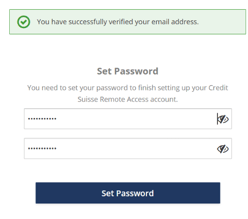
Once the password is set, the system will prompt the user to complete Multi-Factor Authentication (MFA) setup using a QR code.
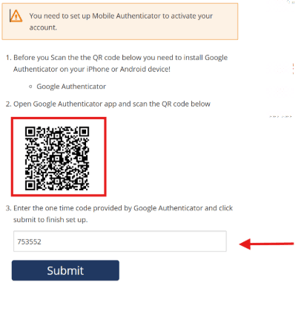
Scan the QR and Enter the code and submit it will go the Login Page of Remote Access Instructions:
- Download the Google Authenticator app on your mobile device from the App Store (iOS) or Google Play Store (Android).
- Open the app and scan the QR code displayed on the RA Portal.
- The app will generate a 6-digit code, which changes every 10 seconds.
- Enter the code within the time limit to complete the login process.