![Neeve-Logo-Lockup-SM_rectangle_reverse .png]](https://support.neeve.ai/hs-fs/hubfs/Neeve-Logo-Lockup-SM_rectangle_reverse%20.png?height=40&name=Neeve-Logo-Lockup-SM_rectangle_reverse%20.png)
1. Symptoms
-
Large file (DGLux project file) downloads failed.
-
Smaller project files downloaded successfully.
2. Root Cause
-
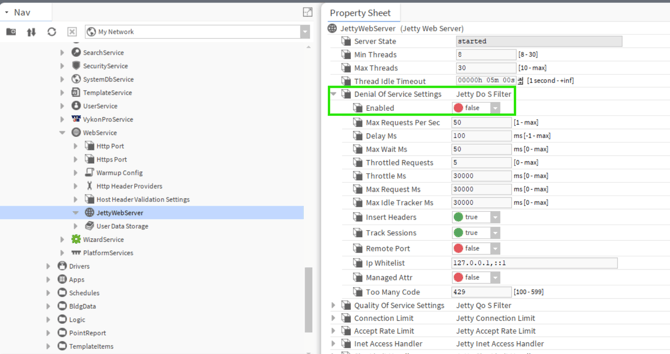
JACE DoS protection was enabled with a 30-second threshold. Long-running HTTP file transfers were terminated after the 30-second limit.
3. Resolution
Identified the JACE DoS/rate-limiting configuration as the cause of the large-file download failure.
- Open the JACE Niagara station.
- Navigate to Config → Services → Web Service → JettyWebServer.
- Change JettyWebServer from Enabled to Disabled.
- Retest the large file (DGLux project backup) download.
- Verify that the large file download completes successfully.