![Neeve-Logo-Lockup-SM_rectangle_reverse .png]](https://support.neeve.ai/hs-fs/hubfs/Neeve-Logo-Lockup-SM_rectangle_reverse%20.png?height=40&name=Neeve-Logo-Lockup-SM_rectangle_reverse%20.png)
Note: You must have Admin permissions in the Neeve Portal to change the port on an existing device.
Follow these steps to update a onboarded device port:
- Log in to the Neeve portal with your username and password.
- Click the Launcher button on the left side of the screen to open the Launcher page.
- Locate the device/endpoint connection and Click the three (meat balls) dots in the top right corner of the tile, then select Edit to open the setup modal.
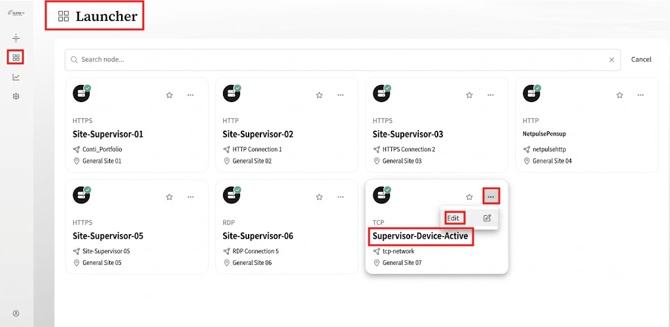
4. Click Edit from the Setup Modal 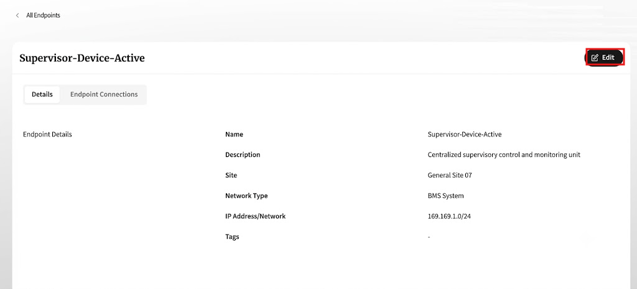
5. Scroll down and click the three dots inside the modal to edit the specific endpoint.
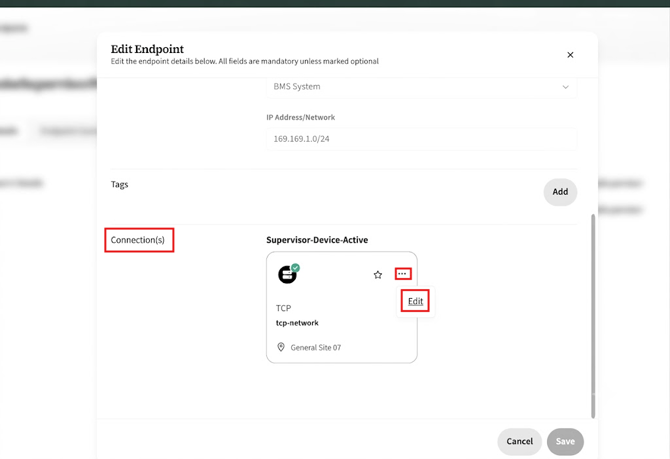
6. Example : Enter your new port number (e.g., 4913) in the endpoint configuration modal.
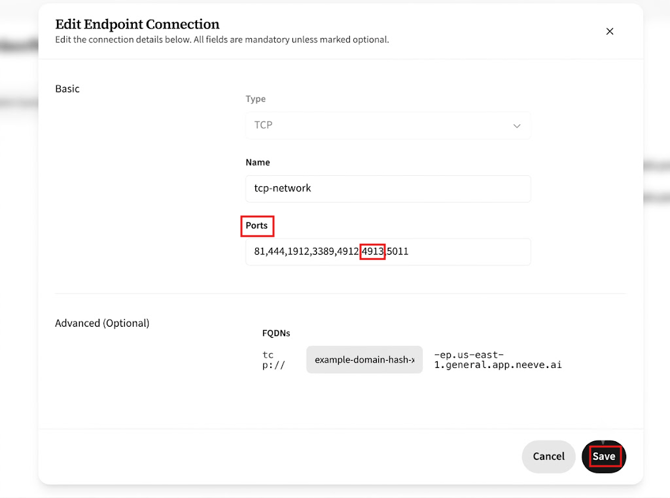
8.Click Save to apply the changes. The Endpoint Connection page will now display your updated port.